










Breaking News
 Today: Congress Votes To Integrate US Military Tech & Supply Chains With Israel
 The Invisible Phone: Ditch PSTN Forever - No IMEI, No IMSI, No KYC, Total Stealth Calling
 Trump Suggests He Could Restart Yemen Bombing Campaign in Response to Red Sea Blockade
 DOJ Probing Harvard Over Financial Aid Programs Linked To China-Based Sources
Top Tech News
 Anthropic is launching its own drug discovery programs for rare diseases using Claude...
 SpaceX AI Satellites Will Have 250 Kilowatts of Power
 Chinese researchers have developed a sodium-metal battery that can fully charge in just 4 minutes...
 SpaceX Starship Flight 13 in 3 Days - Thursday July 13
 Chinese Scientists Develop Nuclear Battery Using Carbon-14
 Teleoperated humanoid robots complete first-ever live surgery
 Floating capsule auto-disinfects water without chemicals or battery
 Modular Reactors To Solve Data Center Hysteria?
 DeepSeek Developing In-House AI Chip In Bid To Cut Nvidia Reliance
 America just took three brand-new nuclear reactors critical in thirty days, a first for any...



Grok Can Now Do Way More With Natural Conversation
Here's what you can do
Phone Calls & Media
"Call John"
"Play my workout playlist"
"Play something upbeat"
Vehicle Controls
"Set temperature to 72°" or "Turn on the AC"
"Make it cooler"
"Open the glovebox"
Ask Your Tesla
"What's my current range?"
"What's the tire pressure?"
"How do I turn on Dog Mode?"
You can follow up naturally too.
After saying "Play something upbeat," you can just say "something more chill" or "skip this one." No need to repeat full commands.
It still does everything it did before
Navigation planning ("Take me to the nearest Supercharger, then the coffee shop")
Location-based reminders ("Remind me to grab milk when I'm near home")
General knowledge questions and conversation
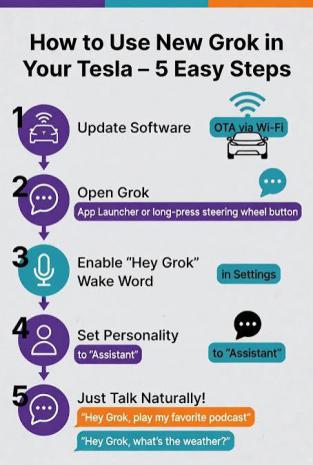
How to Use It – Step by Step
Here's the simple process to get Grok working with the new features
Update Your Tesla
Connect to Wi-Fi and go to Controls > Software. The Summer 2026 update will download and install automatically when parked.
Open Grok
Tap the app launcher (grid icon) → Grok, or long-press the right scroll wheel on the steering wheel.
Enable "Hey Grok" (hands-free)
Go into Grok settings and turn on the wake word so you can just say "Hey Grok" anytime.
Set Personality to "Assistant"
This mode works best for vehicle controls and natural commands.
Start Talking