










Breaking News
 Trump ARRESTS Deep State Agents, ITS HAPPENING
 What Is Another Round of Bombing in Iran Actually Going to Achieve?
 Israeli Quadcopter Drones Set Fire to Gaza Tent Camp, Displacing 800 Palestinians
 CNN: US Forces Ready To Launch Major Attacks Against Iran Within 96 Hours of Receiving...
Top Tech News
 $10k EV hatch packs in 5-minute flash charging
 Apex Recordhunter electric drone sets unofficial speed record
 Space-age manna: USAF & SpaceX drop survival kit from orbit
 World's first nuclear fusion power plant coming to WA | FOX 13 Seattle
 Advanced Small Modular Reactors (SMRs)
 A U.S. energy startup has demonstrated a new type of nuclear reactor that uses existing nuclear...
 BREAKING: NIH-FUNDED MAD SCIENTISTS HAVE CREATED A HUMANOID ROBOT CONTROLLED...
 Modular phone promises total privacy at the flick of a switch
 Genetically Engineered War Dogs for 134 Pound Cyborg Dire Wolves Now – Later 600 Pound Wolves
 They're Quietly REPLACING Our Food With THIS… And Nobody Is Talking About It!



Pi Zero W and HQ camera module used as cheap webcam
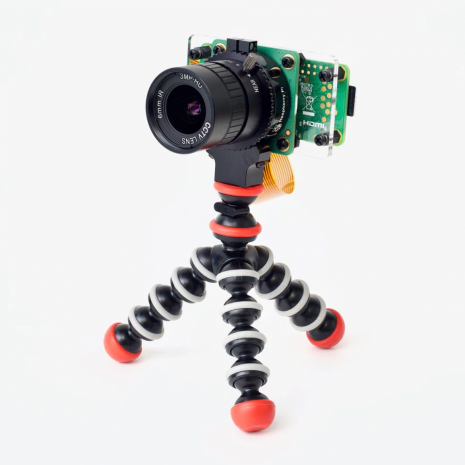
Geerling owns an older model Dell XPS laptop where the camera array is placed at the bottom of the display, which means that you need to rethink your angle of attack to avoid onlookers examining your nose hair during video chats. Not ideal, and something Dell has fixed in newer models.
Rather than requiring a web utility app, often in beta form, the Zero W solution behaves like a standard USB webcam and can be used with the Windows 10 Camera application. While there are plenty of resources online that detail the process of getting OTG webcams to work, most require users to dive under the coding hood.
Geerling wanted to automate the solution for non-coders, so compiled everything needed into an Ansible playbook so that the Pi webcam can run on Mac, Windows and Linux computers. The setup has even been tested with the new Pi 400 and is reported to work well.